

Imagine this.
A shopper visits your store, finds a product they like, and clicks Add to Cart.
What happens next?
If they are taken to a separate cart page, the shopping experience suddenly changes. A new page loads, the shopper leaves the product they were viewing, and they have to take another step before continuing.
It may seem like a small issue, but these extra steps can interrupt the shopping flow.
This is where a WooCommerce side cart can help. Instead of sending shoppers to a separate cart page, it brings the cart directly to them.
Let’s look at what a side cart is and why it can make a difference for a WooCommerce store.
What Is a Side Cart?
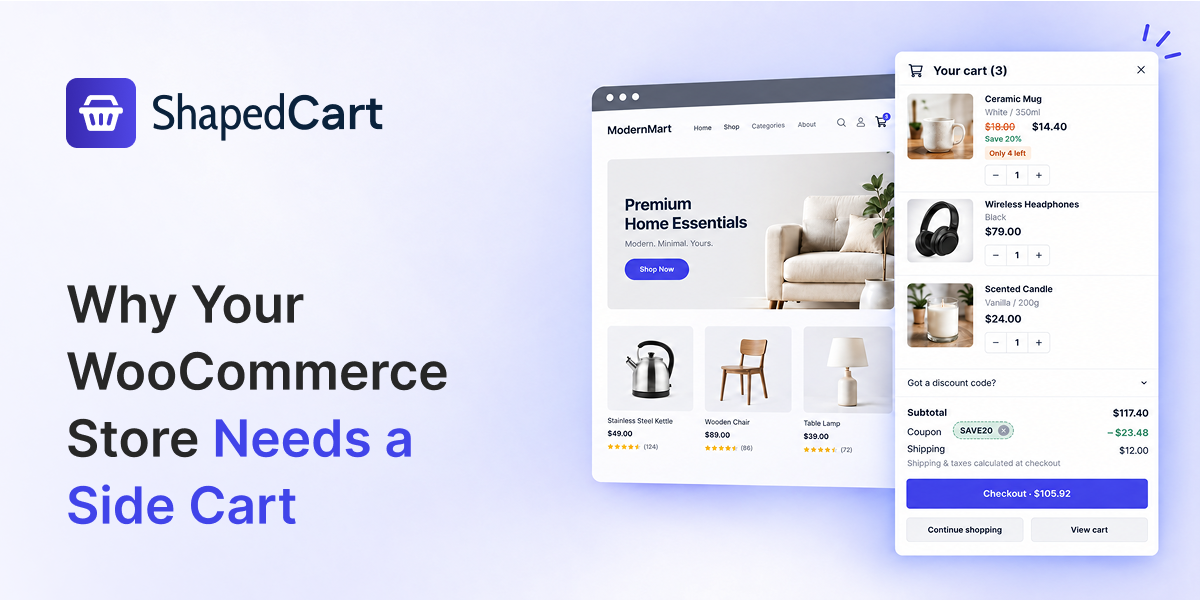
A side cart, also called a cart drawer or mini cart, is a panel that slides into view when a shopper adds a product to their cart.
There is no need to open a separate cart page or reload the current page.
Shoppers can immediately see what they added and manage their cart from the same page.
They can update quantities, remove products, continue shopping, or go to checkout without leaving the page they are browsing.
It is a simple change, but it can make the shopping experience much smoother.
1. Keep Shoppers in the Flow
Every time shoppers are sent to another page, they have to wait and refocus on what they were doing. Even a small interruption can make the shopping journey feel less smooth.
A side cart removes that extra step.
After adding a product, shoppers can quickly check their cart and then continue browsing. They do not have to leave the product or shop page just to manage their cart.
This helps keep the shopping experience focused and connected from product discovery to checkout.
2. Reduce Unnecessary Friction
Cart abandonment is a major challenge for online stores. Shoppers can leave for many reasons, and there is no single solution that prevents every abandoned cart.
However, removing unnecessary steps can make the buying process easier.
A side cart helps by keeping important cart actions close at hand. Shoppers can review their products, change quantities, apply a coupon, or remove an item without navigating through several pages.
The fewer unnecessary steps shoppers need to take, the simpler the buying journey becomes.
3. Keep the Cart Within Reach
A good side cart can also include a floating cart button that stays visible as shoppers browse the store.
This gives shoppers a quick way to check their cart whenever they want.
For example, someone might add a few products and continue browsing other items. Instead of looking for the cart page again, they can simply click the floating cart button to see what they have added.
The cart stays within reach without getting in the way of shopping.
4. Make Checkout Easier to Reach
When shoppers are ready to buy, they should not have to search for the next step.
A side cart can place a clear Checkout button directly inside the cart. Shoppers can review their items and move toward checkout from the same panel.
It also gives them useful options such as Continue Shopping and View Cart, depending on what they want to do next.
This creates a simple path from adding a product to completing the purchase.
5. Give Shoppers the Details They Need
A useful side cart should provide more than just product names and prices.
It can show important product details such as selected variations, sale prices, and savings.
This helps shoppers confirm that they have added the right product with the right options before moving to checkout.
For stores selling products with different sizes, colors, or other variations, this can make cart review much clearer.
6. Create a Better Mobile Shopping Experience
A good shopping experience needs to work well on both desktop and mobile devices.
Shoppers often browse WooCommerce stores from their phones, where moving between different pages can feel less convenient. A properly designed side cart can give them quick access to their cart while keeping the experience suitable for smaller screens.
With a responsive side cart, shoppers can review and manage their products without leaving the page they are browsing.
Does Your WooCommerce Store Need a Side Cart?
Ask yourself a simple question: What happens when a shopper adds a product to the cart?
If they are immediately sent to a separate cart page, there may be an opportunity to make the experience smoother.
A side cart keeps the cart available while shoppers continue browsing. It reduces unnecessary navigation and gives shoppers quick access to important cart actions.
It is not about adding more features just for the sake of it. It is about making an important part of the shopping journey simpler.
Add a Side Cart to Your WooCommerce Store
You do not need to build a side cart from scratch.
ShapedCart adds a free WooCommerce side cart that lets shoppers manage their cart without leaving the page they are browsing.
It supports a slide-out side cart drawer and popup cart, along with features such as automatic cart opening after adding a product, a floating cart button, quantity controls, coupon support, and clear checkout options.
ShapedCart is also completely free, with no Pro version or locked features. Set it up, customize the cart to match your store, and give shoppers a simpler way to manage their products while they brows
Leave a Reply